
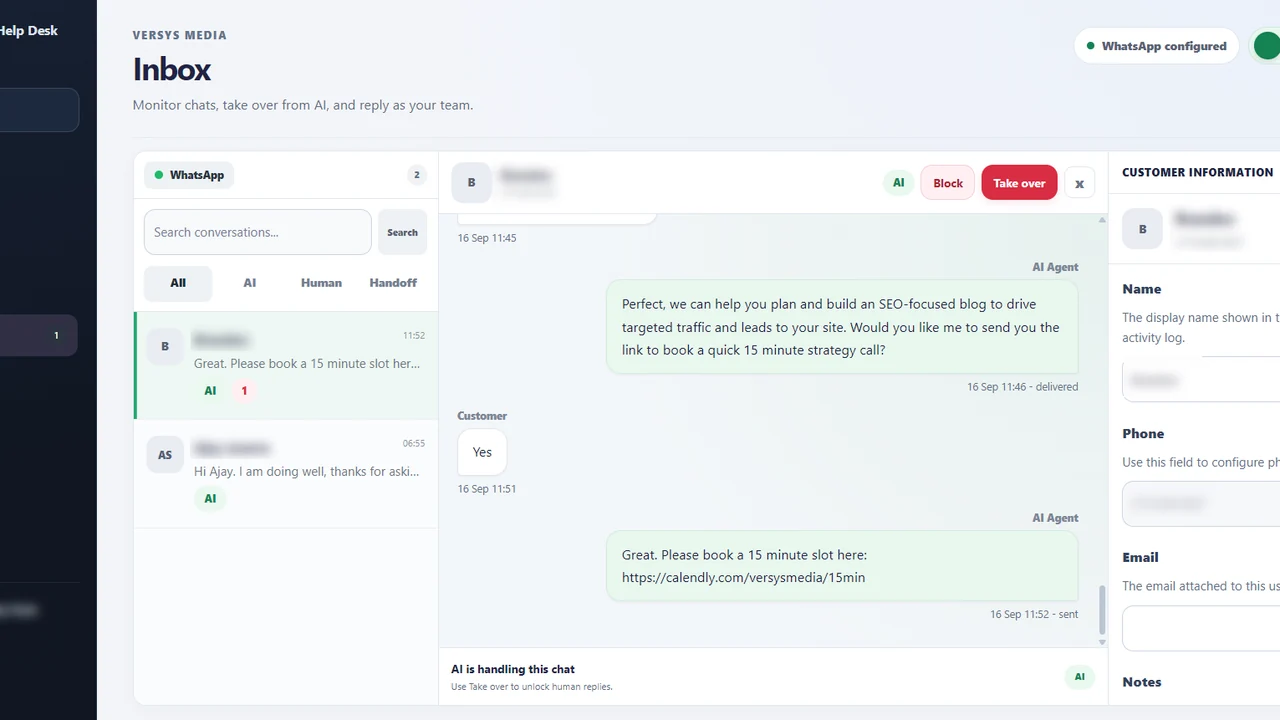
A shared inbox solves little if everyone assumes someone else owns the message. Small support teams need a manageable triage routine that makes urgent conversations visible, gives each request an owner and leaves the AI agent with clearly defined duties. This playbook is designed for teams without a full-time operations manager.
Choose a small, useful set of conversation states
Start with new, AI handling, needs human review, assigned to an owner, waiting for customer and resolved. The labels can differ in your software; what matters is that each state answers whether a person must act and what happens next. Avoid creating fifteen categories that nobody uses consistently.
An example morning routine is to scan messages waiting for human attention, assign each to one teammate, check customer follow-ups from yesterday and then review automated replies that were uncertain. In a small team, a five-minute shared review is often better than a complicated approval chain.
Define urgent, normal and informational work
Urgent cases could include a service outage affecting many clients or an immediate account-access issue. Normal cases include change requests and troubleshooting that can wait for business-hours handling. Informational questions with reliable approved answers can stay in AI mode. The urgency definitions need to match your actual obligations.
Assign a first-response target that your team can meet, and specify working hours. Do not claim every customer gets a response in five minutes if you have one employee covering several tasks. A realistic expectation and proper ownership outperform a flashy but impossible service-level promise.
Make handoff a real ownership change
When a customer asks for a person or the AI cannot answer safely, the conversation should appear in a review queue with a reason and sufficient context. The team member accepting it becomes responsible for the next action. If they need specialist help, reassign it explicitly rather than tagging several colleagues with no clear owner.
Keep useful notes short: issue, what was confirmed, next action and deadline. The customer message history can provide detail, but employees need a crisp summary to work quickly. Check that the system does not continue an automated response while a human has taken control.
Use approved business knowledge without overreach
Routine queries about service coverage, hours, approved setup steps and booking enquiries are good knowledge-base candidates. Every response should have an owner and be reviewed when policies change. Mark draft or internal-only information so it never becomes a public answer simply because it exists in a document.
Our knowledge-base preparation guide covers how to approve and refresh these answers. Use it alongside your triage rules because even a well-written answer is unhelpful if the agent sends it to the wrong conversation or misses a request for human support.
Review the queue with evidence, not guesses
At the end of each week, count messages waiting longer than the agreed target, conversations transferred more than once, unanswered customer follow-ups and cases reopened after being marked resolved. Open a handful of those conversations to understand the cause before changing the automation.
For a managed WhatsApp solution with client-specific settings, view the Versys Media Help Desk. For business-specific implementation, the Versys Media project contact page is the appropriate next step.
A realistic daily routine for a three-person team
Imagine one support lead, one administrator and one technical specialist. At opening time, the lead scans overnight conversations that asked for human help. The administrator takes routine account and billing coordination. The specialist accepts product faults. Every transferred conversation has one current owner even if multiple people add notes. Nobody assumes the AI will continue replying while the case is under human control.
At midday, staff check the waiting queue. If a customer has not replied, the owner records when to follow up instead of closing the conversation for appearance. If a technical issue cannot be resolved that day, the customer receives an honest update and the case retains a deadline. A chat count alone cannot show whether that accountability exists.
The team spends ten minutes on Friday reviewing the oldest open conversations, repeat transfers and a few automated answers. Each finding gets one corrective action, such as updating an outdated article or changing a handoff trigger. That routine scales better than a large dashboard nobody has time to review.
Takeaway checklist
- Keep status labels simple and documented.
- Assign exactly one person to each human-owned conversation.
- Explain support hours and urgency levels honestly.
- Escalate requests for a person without friction.
- Review ageing cases and repeat transfers weekly.
What to do next
Choose one improvement you can complete in the next working week. Write down who owns it, what evidence will show it is working, and how you will check again after rollout. A small, well-tested change is more useful than adding features nobody monitors.
For hands-on help with a business-specific workflow, explore Versys Media or the Versys Apps directory. Bring the process you want to improve, not just a request to add AI everywhere.

